
LG webOS · Android TV

A player designed with love
for a premium experience.

IPTV player for LG webOS and Android TV.
M3U and Xtream playlists on the big screen. You load your own lists: no channels or content are bundled.
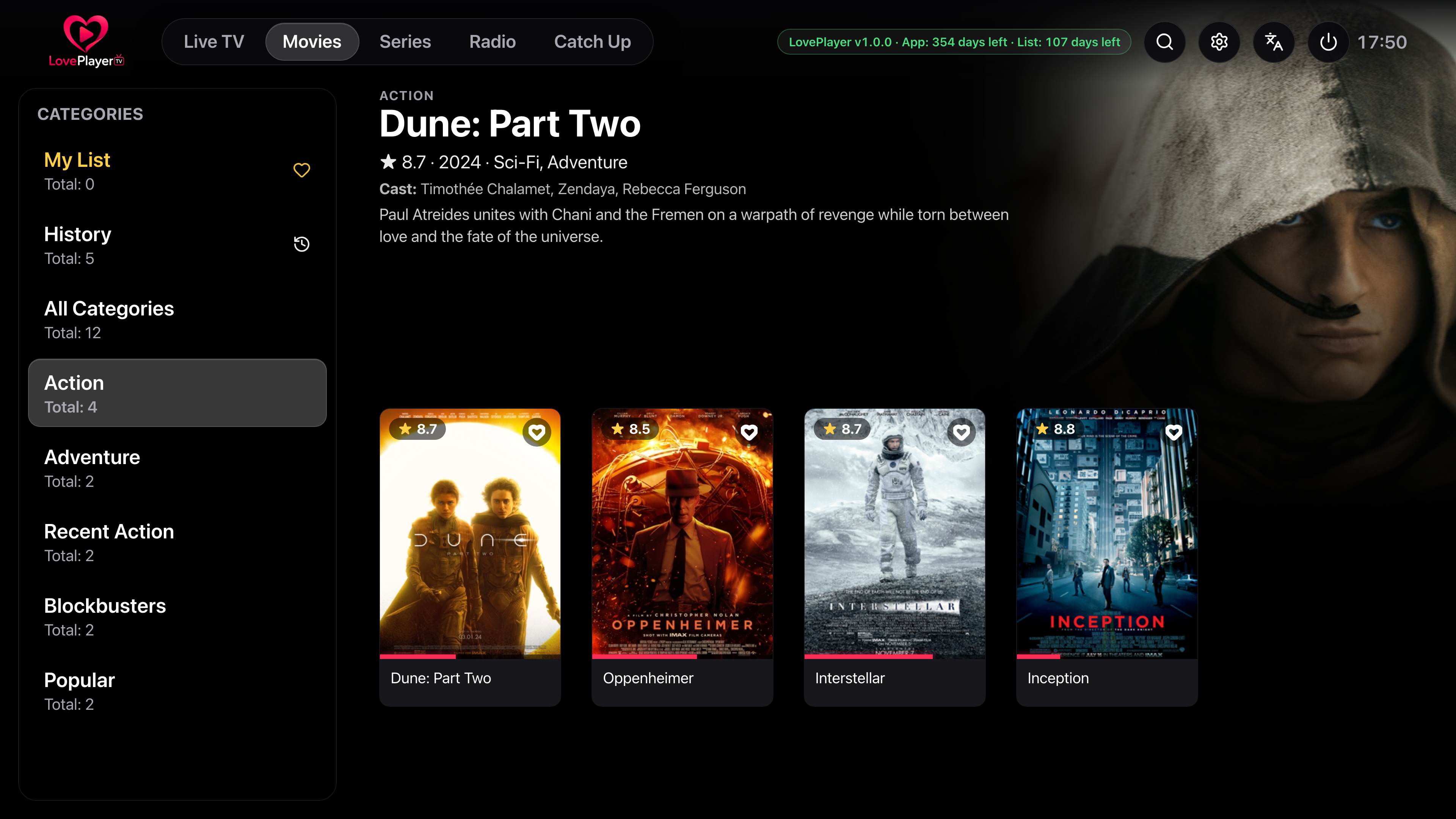
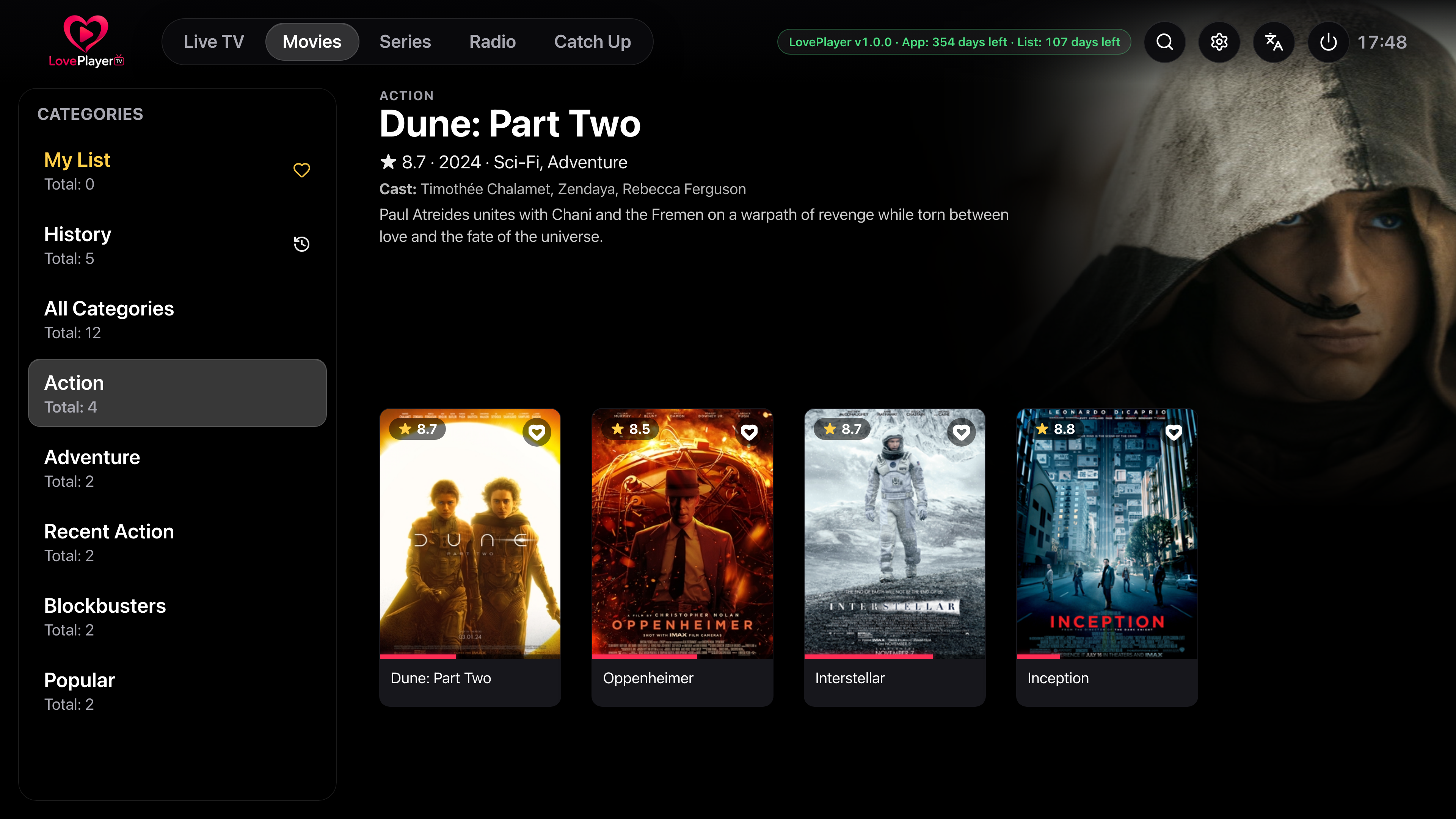
The interface on the big screen
Home, Movies, Series, detail pages, Live and Guide on a black backdrop, search and VOD player — the Lightning app as it appears on a Smart TV.
01
Home
Your catalogue up front: hero, Continue Watching, Top 10 movies and series, then recently added.
Available on your platform
LovePlayer is available on LG webOS and Android TV. The Samsung Tizen version is in active development.

LG webOS
Install LovePlayer from the LG Content Store on your LG Smart TV.
LG Content Store
Android TV
Available on Google TV, Chromecast, Shield and Android TV boxes.

Samsung Tizen
LovePlayer port for Samsung Smart TVs — actively in development.
In developmentWhy LovePlayer stands out
The most complete on the market
Live, Movies, Series, Favorites, Search, EPG, VOD resume, skip intro, parental controls, multi-playlists and QR — all in one app.
A revolutionary UI
Pill navbar, Home hero, Top 10 rails and a backdrop that fades from one title to the next — the most modern big-screen experience.
Simply the smoothest
On-demand loading, filterable categories, instant zapping — no more endless waits like old IPTV apps.
Disclaimer
LovePlayer is a media player only. No channels, subscriptions or content are provided with the app. Each user loads their own playlist and remains solely responsible for its content.
Read full disclaimer →Features
Everything a premium IPTV app should offer — and then some.
Special content
TMDB trailers, teasers and extras — played in your TV’s YouTube app, no iframe.
Remote-friendly UI
Smooth navigation built for the TV remote: clear focus, stable transitions and intuitive back behavior.
Recently added
The latest movies and series on dedicated Home rails — plus Top 10 movies and series.
My List & resume
My List, Continue Watching and VOD resume from where you left off — on home and in each tab.
Skip intro
A button on movies and episodes when the intro is known, and a Next episode card at the end of an episode. Both stay in place, with or without the on-screen controls.
Live TV
Video preview and channel list on a black backdrop, plus the TV Guide. Guide or rails layout is set in Settings.
Category management
Show, hide and reorder categories. Only visible ones are loaded — much faster startup.
Smart loading
Cache-first catalogue: the app opens instantly, then refreshes in the background. Live, Movies and Series load on demand.
Global search
Find a channel, movie or series in a few keystrokes, grouped by type.
Parental controls
PIN code, category locks and per-channel locks (long-press OK on Live).
Multi-playlists & QR
Multiple playlists, instant switching and QR add from your phone — synced across your linked TVs.
Plans & pricing
7-day free trial, then a subscription on loveplayer.app (Stripe): €2.99 / month or €12.99 / year, for up to 2 TVs. No in-app purchase in the LG Content Store.
Add playlists via QR code
No more endless URL typing with the remote. The app shows a QR code on your TV — scan it with your phone, paste your M3U link or Xtream credentials, and the playlist appears in seconds.


Manage your IPTV playlists
Frequently asked questions
Where can I download LovePlayer?+
LovePlayer is available on the LG Content Store (webOS) and on Android TV (Google TV, Chromecast, Shield…). The Samsung Tizen version is in development — see the Platforms section.
Does LovePlayer provide channels?+
No. LovePlayer is a pure media player: it does not include, sell or provide any content. You load your own M3U or Xtream playlist and are solely responsible for it.
Is payment monthly?+
Yes. You choose a monthly subscription (€2.99 / month) or a yearly one (€12.99 / year), tied to your account. On LG, payment is only on loveplayer.app (Stripe) or with an activation code — no in-app purchase in the app or the LG Content Store.
How does the free trial work?+
Every new account gets a full 7-day trial at no cost. After the trial, a monthly or yearly subscription will be required to continue. Up to 2 TVs share the same license.
Can I use LovePlayer on more than one TV?+
Yes — up to 2 TVs at the same time, on the same license. To switch a TV, remove one from My account then pair the new one. That replacement is limited to once per month.
How do I activate LovePlayer?+
Create an account (Google or email), pair your TVs from the app, then subscribe on loveplayer.app (Stripe) or with an activation code. The LG app shows a QR to the website: no payment goes through the LG store.
How do I pair a TV?+
Open LovePlayer on the TV: enter the on-screen code, scan the QR, or sign in with Google from your phone. Up to 2 TVs per account.
How do I add a playlist with QR code?+
In the TV app, choose "Add via QR code": a code appears on screen. Scan it with your phone, fill in the form, and the playlist appears on your TV instantly.
How does Skip intro work?+
On movies and episodes where the intro is known, a Skip intro button appears during playback, whether the controls are showing or not (you can also turn on automatic skipping in Settings). It is not available for every title. At the end of an episode, a Next episode card appears with a countdown.
How can I speed up loading?+
The app first reopens the cached catalogue, then refreshes in the background. To go even faster, hide unused categories in Settings → Manage categories: only visible ones are downloaded.